Week 08 (jQuery)
With jQuery, we can
- Select or find elements
- Update the content / size / visibility of elements
- Simplify event handling
Scripts
Scripts should be placed before the closing </body> tag as
- The script does not block other things from downloading.
- The DOM has already loaded by the time the script is executed.
Selecting Elements
// normal js
document.querySelectorAll('li.hot');

// jquery
jQuery('li.hot');

// jquery shorthand
$('li.hot');
When an element or a set of elements is selected, a jQuery object is created.
The object contains references to the elements.
// Selecting by HTML Tags
$("div") // selects all <div> elements
$("li") // selects all <li> elements
$("p") // selects all <p> elements

// Selecting by CSS/ID
$("#page") // selects any with id of 'page'
$(".hot") // selects any with class of 'hot'
$("li.cool") // selects only <li> with class of 'cool'
$("li.cool a") // selects only <a> that are inside <li> with class of 'cool'

// Multiple Selectors
$("li, p") // selects all <li> and <p>
$("li.hot, p.content") // selects all <li> with a class of 'hot', and all <p> with a class of 'content'
Using the jQuery Object
$('li.hot').hide(); //hides the object
$("p").css('background-color','green') // changes the background colour of all paragraphs to green
.css()
Use .css() to get the value of a CSS property
$("#one").css('color'); // returns its color
$("#one").css('height'); // returns its height
We can alse change the css of a selected element
$('.cool').css('font-size', 20);

// Set multiple CSS values at once.
$('div').css({
    'background-color': 'green',
    'color': 'white'
});
.html()
Use .html() to change the content of the element
$('#two').html('<a>Goodbye World!</a>');
.attr()
Use .attr() to get and set attributes inside tags
$('a').attr('href') // retrieve the valuue of href in <a>
$('a').attr('href', 'newvalue'); // Set the vnew value of the href attribute
Loading JS
$(document).ready(); // loads js only when the page is ready
Adding jQuery
<script src="https://code.jquery.com/jquery-3.5.1.min.js" integrity="sha256-9/aliU8dGd2tb6OSsuzixeV4y/faTqgFtohetphbbj0=" crossorigin="anonymous"></script>
DOM
- Use
remove()to remove an element from the DOM temporarily - Use
clone()to copy selected elements, including child nodes, text and attributes
<!-- HTML -->
<div id="target">
    I'm a small box
    <div class="smallBox">I'm very small</div>
</div>
// jquery
$('#target').clone().insertAfter('.smallBox');
If the selector returns more than 1 element, the modification will affect all of them.
Data Attribute
The data attribute lets us store information in a HTML element.
The name of the data is whatever comes after the dash:
data-NRIC: name is 'NRIC'data-phone-number: name is 'phone-number'
Getting and Setting Data
<span class="highlight" data-color="green">
    Roll over me!
</span>
// getting
$(".highlight".data("color")); // returns "green"

// setting
$(".highlight".data("color","red"));
$(".highlight".data("color")); // returns "red"
Getting and Setting Attributes
<span class="highlight" data-color="green">
    Roll over me!
</span>
// getting
$(".highlight").attr("class"); // returns "highlight"
$(".highlight").attr("data-color"); // returns "green"

// setting
$(".highlight").attr("class","special");
$(".highlight").attr("data-color","red");
hasClass()
hasClass() can be used to check if the document has a specific class.
Creating new HTML Elments
We can use jQuery to create new HTML elements, and add it to the DOM.
var n = $("<p>Hello World</p>");
$("body").append(n);

// alternate method
$("<p>Hello World</p>").appendTo("body");
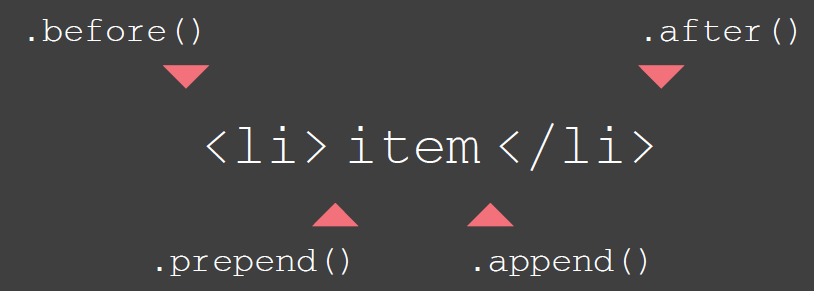
Get and Set Attributes
.attr()
To get or set a specified attribute and its value.
// to get attribute value
$('li#one').attr('id');

// to update attribute value
$('li#one').attr('id', 'hot');
.removeAttr()
Removs a specified attribute and its value.
$('li#one').removeAttr('id');
.addClass()
Add a new value to the existing value of the class attribute. Does not overwrite existing values
$('li#one').addClass('hot');
.removeClass()
Removes a value from the class attribute, leaving any other class names within that attribute intact
$('li#one').removeClass('hot');
Event Object
// event listener with no parameters
function checkUsername(event) {
    var target = event.target // get target of event
    // do something
}

$("#username").on("blur", function(event) {
    checkUsername(event)
})

// event listener with parameters
function checkUsername(event, minLength) {
    var target = event.target; // get target of event
    // do something
}

$("#username").on("blur", function(e) {
    checkUsername(e, 5)
});
Selecting Form Elements
// select all input with the name "username"
$("input[name=username]")

// retrieving value stored in the input element
$("#username").val()

// setting value in input element
$("#username").val("leeroy");

// get selected checkboxes
$("#checkbox:checked") // returns an array of all the checkboxes that are clicked

// check if specific checkbox is selected by id
$("#male").is(":checked")

// detect change in select dropdown
$("select").change()
Effects
Effects are used to enhance page with transitions and movements
Basic Effects
| Method | Description |
|---|---|
show() | Displays selected elements |
hide() | Hides selected elements |
toggle() | Toggles between showing and hiding selected elements |
Fading Effects
| Method | Description |
|---|---|
fadeIn() | Fades in selected elements making them opaque |
fadeOut() | Fades out selected elements making them transparent |
fadeTo() | Changes opacity of selected elements |
fadeToggle() | Hides or shows selected elments by changing their opacity (opposite of current state) |
Sliding Effects
| Method | Description |
|---|---|
slideUp() | Hides selected elements with a sliding motion |
slideDown() | Hides selected elements with a sliding motion |
slideToggle() | Hides or show selected elements with a sliding motion (opposite direction of current state) |
Custom Effects
| Method | Description |
|---|---|
delay() | Delays execution of subsequent items in queue |
stop() | Stops an animation if it is currently running |
animate() | Creates custom animation |