Week 02
Semantic Web (HTML5 Semantics)
<div> element in itself has no meaning. It is simply a container
There is often a more specific semantic choice to use
Should only be used when no other semantic element is appropriate
<p>tells us that the content is a paragraph<h1>tells us that the text is the top level heading of the page
Common Elements
| Name | Details |
|---|---|
<header> | here |
<nav> | here |
<article> | here |
<section> | |
<table> | here |
<details> | |
<figure> | |
<form> | |
<aside> | here |
<mark> | |
<main> |
<header> tag
Usually used for navigation or introductory content.
- Can be used at the top of page content to encapsulate navigation, logos
- Often used in
<article>tags
<header>
  <h1>Most Important Heading</h1>
  <h3>Less Important Heading</h3>
  <p>Additional content</p>
</header>
<article> tag
- Contains 1 or more heading tags (
<h1>...<h6>) - Commonly used for news content, blog posts, or independent content piece
<article>
  <header>
    <h1>Most Important Heading</h1>
    <h3>Less Important Heading</h3>
    <p>Additional content</p>
  </header>
</article>
<article>
  <h1>This is a Heading</h1>
  <p>This is a paragraph in the article</p>
</article>
<p>This is a separate paragraph</p>
<nav> tag
Usually for location of menu links
<nav>
  <a href ="/html/">html</a> |
  <a href ="/css/">css</a> |
  <a href ="/js/">JavaScript</a>|
</nav>
This is for key navigation elements in the site and NOT for every link in a site.
<aside> tag
For content that is indirectly related to your main content
- Commonly seen in sidebars or call out boxes
CSS (Cascading Style Sheet)
CSS defines the colour, size and position of the content.
CSS Rule
p{color:purple;}
p{color:purple;} is called a CSS Rule
- declaration →
{color:purple} - selector →
p(all paragraphs in webpage will be affected) - property →
color- value →
purple(text will be purple)
- value →
Styling in HTML
Let's explore how we can include styles in HTML
Inline Style
- Applies directly to individual elements with a HTML element's
styleattribute - Targets only that element
<p style="text-align: left;">
  Just a sentence
</p>
Style Element <style>
- Appears as a child of the
<head>element in the file - Styles all occurences of a target that are on the page
<head>
    <style>
        *, body(
            font-family: Arial, Helvetica, sans-serif;
        )
        p{color: green;}
    </style>
</head>
Link External Style Sheet <link>
This is the most commonly used/preferred method
- Set of style rules defined in an external file
- Appears as child of the
<head>element of the file - Styles all occurences of a target that are on a page
- Central external point for styling many pages
<head>
    <link rel="stylesheet" href="basic.css" type="text/css">
</head>
Import @import
- Set of style rules defined in an external file
- Should appear as a first rule in an external stylesheet
- Used to chain multiple external files together
Colors
There are different ways to apply different colours to our website.
colorproperty changes text colour.background-colorproperty changes background colour (default is transparent).
Hexadecimal
- A string of 6 hexademicals (from 0-F)
- Covers 16.7 million colours
- #fffff = white
- #00000 = black
h1{
    color: #000000;
}

h2{
    color: #4b0082;
}

h3{
    color: #ff1493;
}
RGB
- 3 channels: Red, Green and Blue
h1{
    color: rgb(0,0,0);
}

h2{
    color: rgb(75,0,130);
}

h3{
    color: rgb(255,20,147);
}
RGBA
- RGB but with an alpha(transparency) channel
h1{
    color: rgba(11, 99, 150, 1);
}

h2{
    color: rgba(11, 99, 150, 0.6);
}

h3{
    color: rgba(11, 99, 150, 0,2);
}
ID Attribute #myElement
- Selects any element with the ID
myElement- E.g.
<p id="myElement"></p>
- E.g.
- Unique only to that element
- Only one ID per element
<!DOCTYPE html>
<html>
<head>
  <title>Document</title>
  <style>
  #myElement{color:#23FBFF;}
  </style>
</head>
<body>
  <p id="myElement">
    A paragraph with <em>emphasis</em> and styled
  </p>

  <p>
    A normal paragraph
  </p>
</body>
</html>
A normal paragraph
Class Attribute .myClass
- Selects any element with the class name
myClass- E.g.
<p class=myClass></p>
- E.g.
- Used to style an element grouping
- Targets one or more element's class attribute
- Elments
<!DOCTYPE html>
<html>
<head>
  <title>Document</title>
  <style>
  .myClass{font-family:Arial, Helvetica, sans-serif;
  color:#6E3B04;
  }
  </style>
</head>
<body>
  <h1 class="myClass">A styled header<h1>
  <p class="myClass">
    A paragraph with <em>emphasis</em> and styled
  </p>

  <p>
    A normal paragraph
  </p>
</body>
</html>
A normal paragraph
Pseudo Classes
A set of pseudo classes can style anchor
<a>elements depending on their state.
| Pseudo Class | Element State |
|---|---|
| :link | unvisited link |
| :visited | visited link |
| :hover | moused over link |
| :active | current link |
| :focus | focused link |
Making IDs and Class Names
Rules to follow
- Describe the content, not the presentation. ("warning", not "redbox")
- Use all lowercase. Add hyphens for readability. ("header-info", not "headerInfo")
- Use hyphens to show that a class or ID is part of something else. ("footer", "footer-copyright", "footer-logo")
- Preferably no camel case (check what is camel case before publishing)
Typography
Possible font properties
font: All propertiesfont-familyfont-size: px, em, %, xx-small to xx-largefont-style: normal, italic, obliquefont-variant: normal, small-capsfont-weight: bold, bolder, lighter, normal, 100-900line-height: line height between two lines of texttext-align: alignment of the text within the box
Use quotes for fonts with a space in their names! E.g. "Fira Sans"
Box Model
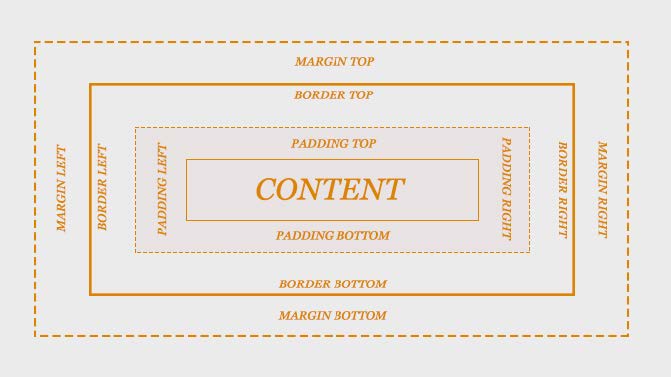
- Margin: Pixel boundary outside the box
- Padding: Pixel boundary inside the box
CSS3 Web Gradients
CSS3 displays smooth transitions between two or more specified colours, with reduced download time and bandwidth usage.
Elements with gradients look better when zoomed as the gradients are generated by the browser itself.
- Linear gradients: down, up, left, right, diagonal
- Radial gradients: defined by the center
Sites to get gradient colours: