Week 01
In this week's lecture, we get an introduction to computer systems.
Computer System Basics
A computer system is an electronic device, operating under the control of instructions stored in memory, that can accept data, process data according to specific rules, produce results, and store the results for future use.
Components of a Computer System
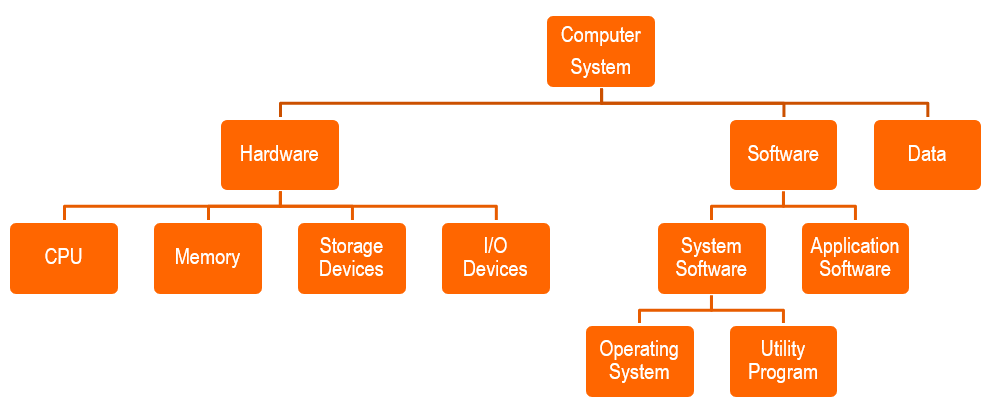
Hardware Components
Motherboard - CPU, Memory
Two main components on the motherboard are:
- Processor
- Also called the Central Processing Unit, it is the electronic component that interprets and carries out the basic instructions that operate the computer.
- Memory
- Consists of electronic components that store instructions waiting to be executed and data needed by those instructions.
Input Devices
Keyboard, mouse, scanner, web-camera, microphone
- Gathers input data from the user and translates it into a form that the computer can process.
- Allows user to enter data and instructions into a computer.
Output Devices
Monitor, Printer, Speaker
- Shows the results of the processing operation in a way people can understand.
Storage Devices
Solid State Drive, Optical Disk, Disk Drive, Memory Cards, USB Flash Drive
- Computer keeps data, instructions and information on storage devices.
- Storage device reads and writes items to and from storage media.
Servers
- Control access to hardware, software and other resources on a network.
- Provide centralised storage area for programs, data and information.
- Supports up to several thousand connected computers at the same time.
Processor/Microprocessor
Central Processing Unit (CPU)
- Often referred to as the "brains" of the computer.
- Also known as the processor or microprocessor.
- Responsible for executing a sequence of instructions stored in the memory.
- Takes input from an input device, processes the input, and output the results to an output device.
32-bits VS 64-bits CPU
64-bits architecture
Most modern CPU architecture is based on th e 64-bit design.
Allows system to access beyond 8GB of RAM (264 = 16EB)
- [Internal registers] and data buses are 64-bits
- Increased data bandwidth
- More data can be transferred using a 62-bit data bus as compared to a 32-bit data bus.
- CPU can handle bigger range of numbers (232 VS 264)
32-bits architecture
Maximum memory addresses cannot go beyond 4GB of RAM (232 = 4GB)
Clock Speed
CPU requires a fixed number of clock ticks (clock cycles) to execute each instruction.
- Faster clock → more instructions executed per second
- Clock speeds are expressed in Gigahertz
Each instruction set has a different way of addressing methods with different clock cycle/tick needed.
Instruction Set
A set of codes that the computer processor can understand.
- Usually in binary (1s and 0s), or machine language.
- Contains instructions or tasks that control the movement of bits and bytes within the processor.
- Example of instruction sets:
- ADD - Add two numbers together
- JUMP - Jump to designated RAM addresses
- LOAD - Load information from RAM to CPU
- Different processor has different instruction sets.
CPU Core
- Originally, CPUs had a single core. This meant that one physical CPU had a single central processing unit on it.
- For each processor core that is physically present in the CPU, the operating system addresses two virtual (logical) cores and shares the workload between them when possible.
- To further improve performance, manufacturers can add additional "cores".
- A dual-core CPU has 2 central processing units, so it appears to the operating system as two separate CPUs.
- Having multiple cores means that the computer can work on more than one task at a time more efficiently, which will help keep the system running fast even if tasks such as antivirus scans are running in the background.
CPU Cache
The internal memory inside the CPU.
Cache memory is very high-speed memory that holds the most recent and frequently used data and instructions that have been loaded by the CPU.
- There are 3 levels of CPU Cache:
- CPU Resident Cache (Level-1)
- Off-chip Cache (Level-2)
- Shared Cache (Level-3)
- For the processor, integrated into CPU and serves all cores.
- Helps to speed up performance of the CPU.